11 Mart 2015 Çarşamba

Ado da kodla access tablosuna insert işlemi


using System;
using System.Collections.Generic;
using System.ComponentModel;
using System.Data;
using System.Drawing;
using System.Linq;
using System.Text;
using System.Windows.Forms;
using System.Data;
using System.Data.OleDb;

namespace uyg_089_ado_kod_insert
{
    public partial class Form1 : Form
    {
        public Form1()
        {
            InitializeComponent();
        }

        OleDbConnection baglanti = new OleDbConnection();
        OleDbDataAdapter adapter = new OleDbDataAdapter();
        OleDbCommand komut = new OleDbCommand();
              
        private void btnKaydet_Click(object sender, EventArgs e)
        {
            baglanti.ConnectionString = "Provider=Microsoft.ACE.OLEDB.12.0;Data Source=data.accdb";
            komut.Parameters.Add("pads", OleDbType.VarChar, 255);
            komut.Parameters.Add("ptel", OleDbType.VarChar, 255);
            komut.Parameters.Add("peposta", OleDbType.VarChar, 255);
            komut.Parameters.Add("psifre", OleDbType.VarChar, 255);
            komut.Parameters["pads"].Value = textAds.Text;
            komut.Parameters["ptel"].Value = textTel.Text;
            komut.Parameters["peposta"].Value = textEposta.Text;
            komut.Parameters["psifre"].Value = textSifre.Text;
            //komut.CommandText = "insert into users (ads, tel, eposta, sifre) values (@pads, @ptel, @peposta, @psifre)";
            komut.CommandText = "insert into users (ads, tel, eposta, sifre) values (?, ?, ?, ?)";
            //? kullanarak yaparsanız commandtext teki alan sırasıyla parametre ekleme sırası aynı olmalıdır.
            komut.Connection = baglanti;
            komut.CommandType = CommandType.Text;
            adapter.InsertCommand = komut;
            baglanti.Open();
            komut.ExecuteNonQuery();
            baglanti.Close();
            MessageBox.Show("Kayıt işlemi tamanlanmıştır.");
        }
    }
}


2 Mart 2015 Pazartesi

for ve while döngüleri ile asal sayıların seri olarak yazdırılması

Aşağıdaki örnekte 100 e kadar olan asal sayılar konsol ekranına seri olarak yazdırılmıştır. Sayının asal olup olmadığı anlaşıldığı anda içteki döngüden çıkıp diğer sayıya geçmektedir.

using System;
using System.Collections.Generic;
using System.Linq;
using System.Text;

namespace CA_031_asal_seri
{
    class Program
    {
        static void Main(string[] args)
        {
            int i,j;
            bool asal;
    
            for (i = 1; i <= 100; i++)
            {
                j = 2;
                asal = true;
                while (asal == true && j < i)
                {
                    if (i % j == 0) asal = false;
                    j++;
                }
                if (asal == true) Console.WriteLine(i);
            }
        }
    }
}

While Döngüsü ile Asal Sayı Kontrolü

Aşağıdaki örnekte kullanıcının  girdiği bir sayının asal olup olmadığı bulunuyor. Bu işlem için while döngüsünü kullandık. While şartlı bir döngüdür. Başlangıçta belirtilen şart doğru olduğu sürece döngü içerisindeki komutlar çalışır. Buradaki püf noktası bir sayının asal olmadığı ne zaman anlaşılırsa o zaman döngüden çıkıp diğer sayılarla gereksiz işlem yapmamasının sağlanmasıdır. Örneğin 10 sayısı 2 ye tam bölündüğünde asal olmadığı daha ilk işlemde anlaşılacaktır. Bu durumda bizim while döngümüz sadece 1 defa çalışacaktır. Gereksiz işlemlerin programımızı yavaşlattığı düşünüldüğünde bir programcının yapması gereken en doğru algoritmayı bulmaktır. :) Tabiki bazen en doğru algoritmayı bulmak mümkün olmayabiliyor, işimizin görüldüğüne bakıyoruz. Ama siz siz olun her zaman sonuca en doğru çözümlerle ulaşmaya çalışın.

using System;
using System.Collections.Generic;
using System.Linq;
using System.Text;

namespace CA_030_dongu_asal
{
    class Program
    {
        static void Main(string[] args)
        {
            int sayi = int.Parse(Console.ReadLine());
            bool asal=true;
            int i=2, sayac = 0;
            while (asal == true && i < sayi)
            {
                if (sayi % i == 0) asal = false;
                i++; sayac++;
            }
            if (asal == true) Console.WriteLine("Asaldır");
            else Console.WriteLine("Asal Değildir");
            Console.WriteLine("Döngü Sayısı:" + sayac);
        }
    }
}

İç içe for döngüsü, çarpım tablosu

Aşağıdaki örnekte iç içe for döngüsü ile yapılmış olan konsol çarpım tablosu vardır.

using System;
using System.Collections.Generic;
using System.Linq;
using System.Text;

namespace CA_024_carpimtablosu
{
    class Program
    {
        static void Main(string[] args)
        {
            // Aşağıdaki çıktıdaki gibi Çarpım Tablosunu yazdırınız.
            // 1 x 1 = 1        2 x 1 = 2       3           4           5
            // 1 x 2 = 2
            // ...
            // 1 x 10 = 10      2 x 10 = 20
            //
            // 6                7               8           8           10

            int x, y,satir=0,sutun=0;
            for (x = 1; x <= 10; x++)
            {
                if (x >= 6) satir = 12;
                else satir = 0;
                if (x == 6) sutun = 0;
                for (y = 1; y <= 10; y++)
                {
                    Console.SetCursorPosition(sutun, satir);
                    Console.WriteLine("{0} x {1} = {2}", x, y, x * y);
                    satir++;
                }
                sutun += 13;
            }
        }
    }
}

11 Aralık 2013 Çarşamba

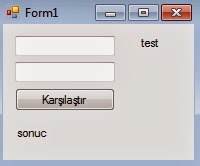
C# da String.Compare ile String karşılaştırma

Kullanımı:
 ----------
String.Compare(string1, strin2); Eğer stringler aynı ise fonksiyon geriye 0 döndürür. 1.string 2.stringden küçükse fonksiyon geriye -1, büyükse 1 döndürür.


Örnek Kod:
----------
 private void button1_Click(object sender, EventArgs e)
 {
 int a = String.Compare(textBox1.Text, textBox2.Text);
 test.Text = a.ToString();
 if (a == 0) sonuc.Text = "Bilgiler Aynı";
 else if (a < 0) sonuc.Text = textBox1.Text + " " + textBox2.Text + " den küçük";
 else sonuc.Text = textBox1.Text + " " + textBox2.Text + " den büyük";
 }

19 Eylül 2011 Pazartesi

C# Console da Write ve WriteLine Komutları

namespace ConsoleApplication1
{
class Program
{
static void Main(string[] args)
{
Console.Write("Merhaba C#");
Console.WriteLine("Merheba ASP.NET");
Console.WriteLine("Bir Tuşa Basınız");
Console.ReadKey();
}
}
}

Açıklama: Write ve WriteLine komutları C# Console uygulamalarında ekrana metin yazdırmak amacıyla kullanılır. Line eklentisi yazım işleminden sonra imlecin bir alt satıra geçmesini sağlar.

2 Aralık 2010 Perşembe

2 Boyutlu Dizi Örneği

using System;
using System.Collections.Generic;
using System.Text;

namespace Console_dizi_cokboyutlu
{
class Program
{
static void Main(string[] args)
{
int[,] dizi = new int[4, 3];
int i, j,sutun=1,satir=1;
for (i = 0; i < 4; i++)
{
for (j = 0; j < 3; j++)
{
Console.SetCursorPosition(sutun, satir);
Console.Write(".");
sutun += 6;
}
sutun = 1;
satir += 4;
}
sutun = 1; satir = 1;
for (i = 0; i < 4; i++)
{
for (j = 0; j < 3; j++)
{
Console.SetCursorPosition(sutun, satir);
dizi[i, j] = int.Parse(Console.ReadLine());
sutun += 6;
}
sutun = 1;
satir += 4;
}
Console.ReadKey();
}
}
}

30 Eylül 2010 Perşembe

C# da Değişken Tipleri

Tam Sayı Değişken Tipleri
-------------------------
Type Size Range (aralık)
sbyte 8 -128 to 127
byte 87 0 to 255
short 16 -32768 to 32767
ushort 16 0 to 65535
int 32 -2147483648 to 2147483647
uint 32 0 to 4294967295
long 64 -9223372036854775808 to 9223372036854775807
ulong 64 0 to 18446744073709551615
char 16 0 to 65535

Ondalıklı Değişken Tipleri
--------------------------
Type Size Range
float 32 7 digits 1.5 x 10-45 to 3.4 x 1038
Double 64 15-16 digits 5.0 x 10-324 to 1.7 x 10308
Decimal 128 28-29 decimal places 1.0 x 10⁻²⁸ to 7.9 x 1028

Diğer Değişken Tipleri
----------------------
string karaktersel ifadeler için kullanılır
bool mantıksal değişken. (true ve false değerlerini alır)

C# da Parse Methodu ile Tip Dönüşümleri

Açıklama:
---------
Parse, String tipteki verilerin sayısal tiplere dönüşümünü sağlayan methoddur.

Kullanımı:
----------
tip_adı.Parse(string veri);

Örnek Kodlama:
--------------
using System;
using System.Collections.Generic;
using System.Text;

namespace console_008
{
class Program
{
static void Main(string[] args)
{
int a, b, t;
Console.Write("1.Sayıyı Giriniz :");
a = int.Parse(Console.ReadLine());
Console.Write("2.Sayıyı Giriniz :");
b = int.Parse(Console.ReadLine());
t = a + b;
Console.WriteLine("Sayıların Toplamı :"+t);
Console.ReadKey();
}
}
}

C# Console da ReadLine( ) komutu

Açıklama:

Console ortamında klavyeden bilgi okutmak amacıyla kullanılan bir komuttur. Okutulan bilgiler her zaman string tipindedir. Dolayısıyla sayı ya da başka tipte kullanım yapılmak istendiğinde tip dönüşümü yapılması gerekir. Tip dönüşümleri başka derslerde açıklanacaktır.

Örnek Kodlama :
---------------

using System;
using System.Collections.Generic;
using System.Text;

namespace console_007
{
class Program
{
static void Main(string[] args)
{
string s;
s = Console.ReadLine();
Console.WriteLine("Girdiğiniz Metin : "+s);
Console.ReadKey();
}
}
}

14 Mayıs 2010 Cuma

C# da Text Dosyadan Kayıt Silme İşlemi

string ad, soyad, tel, yol, yol2;
FileStream dosya, dosya2;

private void Form1_Load(object sender, EventArgs e)
{
yol = Application.StartupPath + "\\telefon.txt";
yol2 = Application.StartupPath + "\\gecici.txt";
}

private void button4_Click(object sender, EventArgs e)
{
dosya = new FileStream(yol, FileMode.OpenOrCreate, FileAccess.Read);
StreamReader okuma;
okuma = new StreamReader(dosya);

dosya2 = new FileStream(yol2, FileMode.Create, FileAccess.Write);
StreamWriter yazma;
yazma = new StreamWriter(dosya2);

do
{
ad = okuma.ReadLine();
soyad = okuma.ReadLine();
tel = okuma.ReadLine();
if (textBox1.Text != ad)
{
yazma.WriteLine(ad);
yazma.WriteLine(soyad);
yazma.WriteLine(tel);
}
}
while (ad != null);
okuma.Close();
yazma.Close();
File.Delete(yol);
File.Move(yol2, yol);
}

C# da Text Dosyada Kayıt Arama İşlemi

string ad, soyad, tel, yol, yol2;
FileStream dosya, dosya2;

private void Form1_Load(object sender, EventArgs e)
{
yol = Application.StartupPath + "\\telefon.txt";
yol2 = Application.StartupPath + "\\gecici.txt";
}

private void button3_Click(object sender, EventArgs e)
{
Boolean bul;
bul = false;
dosya = new FileStream(yol, FileMode.OpenOrCreate, FileAccess.Read);
StreamReader okuma;
okuma = new StreamReader(dosya);
do
{
ad = okuma.ReadLine();
soyad = okuma.ReadLine();
tel = okuma.ReadLine();
if (textBox1.Text == ad)
{
bul = true;
textBox2.Text = soyad;
textBox3.Text = tel;
}
}
while (ad != null);
if (bul == false) MessageBox.Show("Aradığınız Kayıt Bulunamadı");
okuma.Close();
}

C# da Text Dosyadan Okuma İşlemi (Listeleme)

string ad, soyad, tel, yol, yol2;
FileStream dosya, dosya2;

private void Form1_Load(object sender, EventArgs e)
{
yol = Application.StartupPath + "\\telefon.txt";
yol2 = Application.StartupPath + "\\gecici.txt";
}

private void button2_Click(object sender, EventArgs e)
{
dosya = new FileStream(yol, FileMode.OpenOrCreate, FileAccess.Read);
StreamReader okuma;
okuma = new StreamReader(dosya);
listBox1.Items.Clear();
listBox2.Items.Clear();
listBox3.Items.Clear();
do
{
ad = okuma.ReadLine();
soyad = okuma.ReadLine();
tel = okuma.ReadLine();

if (ad != null)
{
listBox1.Items.Add(ad);
listBox2.Items.Add(soyad);
listBox3.Items.Add(tel);
}
}
while (ad != null); //Şart sağlandığı sürece döngü çalışır.
okuma.Close();
}

C# da Text Dosyaya Kayıt İşlemi

string ad, soyad, tel, yol, yol2;
FileStream dosya, dosya2;

private void Form1_Load(object sender, EventArgs e)
{
yol = Application.StartupPath + "\\telefon.txt";
yol2 = Application.StartupPath + "\\gecici.txt";
}
//Kaydet Butonu
private void button1_Click(object sender, EventArgs e)
{
ad = textBox1.Text;
soyad = textBox2.Text;
tel = textBox3.Text;
dosya = new FileStream(yol, FileMode.Append, FileAccess.Write);
StreamWriter yazma;
yazma = new StreamWriter(dosya);
yazma.WriteLine(ad);
yazma.WriteLine(soyad);
yazma.WriteLine(tel);
yazma.Close();
}

25 Mart 2010 Perşembe

C# da Operatörler

Matematiksel Operatörler
........................
+ Toplama
- Çıkarma
* Çarpma
/ Bölme
++ Artırma
-- Eksiltme
% Mod

Mantıksal Operatörler
.....................
< Küçüktür
> Büyüktür
<= Küçük Eşit
>= Büyük Eşit
== Eşit
!= Eşit Değil
&& Ve
|| Veya

Diğer Operatörler
.................
= Aktarma
// Açıklama satırı

24 Mart 2010 Çarşamba

C# da Foreach Döngüsü

foreach ile nesneler döndürülebilir.
Örneğin aşağıdaki program, formun üzerindeki tüm textBox lara "Kütahya" yazar. Ayrıca formdaki textBox ları ve combobox ları sayarak sonuçları labellarda gösterir.


private void Form1_Load(object sender, EventArgs e)
{
int i=0, j=0;
foreach (Control cont in this.Controls)
{
if (cont is TextBox)
{
cont.Text = "Kütahya";
i++;
}
if (cont is ComboBox) j++;
}
label1.Text = i.ToString();
label2.Text = j.ToString();
}

C# ile mail gönderme


Öncelikle projeye kod sayfasının en üstünde aşağıdaki şekilde .net mail sınıfını dahil etmeniz gerekir.

using System.Net;
using System.Net.Mail;
.
.
Gönderinin adresi hotmail ise smtp adresi: smtp.live.com
gmail için ise : smtp.gmail.com
Her ikisi için port numarası 587 dir.
.
.
Form Kodu:

private void button1_Click(object sender, EventArgs e) //Gönder butonu
{
SmtpClient istemci = new SmtpClient(this.gonderenSMTP.Text,Convert.ToInt32(port.Text));
MailAddress gon = new MailAddress(this.gonderenMail.Text, this.gonderenAd.Text);
MailAddress alan = new MailAddress(this.kime.Text, this.kime.Text);
MailMessage msg = new MailMessage(gon, alan);
msg.Subject = this.baslik.Text;
msg.Body = this.mail.Text;
istemci.EnableSsl = true;
if (label8.Text != "")
{
Attachment ekle = new Attachment(@label8.Text);
msg.Attachments.Add(ekle);
}
System.Net.NetworkCredential SMTPUserInfo = new System.Net.NetworkCredential(this.gonderenMail.Text, this.gonderenSifre.Text);
istemci.UseDefaultCredentials = false;
istemci.Credentials = SMTPUserInfo;
istemci.Send(msg);
}

private void button2_Click(object sender, EventArgs e) //Dosya ekle butonu
{
openFileDialog1.ShowDialog();
label8.Text = openFileDialog1.FileName.ToString();
}

C# da Switch( ) Yapısı

Açıklama:
if benzeri bir komut yapısıdır. Belli bir değişkenin aldığı değerlere göre işlem yapılmasını sağlar.

Kullanımı:
.
.
.
switch(değişken)
{
case değer1: komut1; break;
case değer2: komut2; break;
case değer3: komut3; break;
case default: komut4; break;
}

Eğer değişken değerlerin hiç birine sahip değilse default dan sonraki komutlar çalışır. Default yazılmak zorunda değiildir.


private void button1_Click(object sender, EventArgs e)
{
int secim;
secim = int.Parse(textBox1.Text);
switch (secim)
{
case 1: label1.Text = "0"; break;
case 2: label1.Text = "1"; break;
case 3: label1.Text = "2"; break;
default: label1.Text = "Geçersiz Seçim"; break;
}
}

C# da Do While ve While Döngüleri

While Döngüsü:
---------------
Belli bir şarta bağlı olarak istenilen komutların çalıştırılmasını sağlar.
Kullanımı:
---------
While (şart)
{
...komutar
}

Komutları hiç çalıştırmadan döngü başında şarta bakar.
Şart sağlandında komutları çalıştırır ve tekrar döngü başına gelir.
Şart sağlandığı sürece komutları çalıştırmaya devam eder.

Do ... While Döngüsü:
---------------------
Belli bir şarta bağlı olarak istenilen komutların çalıştırılmasını sağlar.
Kullanımı:
---------
Do
{
...komutlar
}
while (şart);

Şarta bakmaksızın komutları bir defa çalıştırır ve daha sonra şarta bakar.
Şart sağlandığı sürece komutları çalıştırmaya devam eder.

Örnek Kod:

private void Form1_Load(object sender, EventArgs e)
{
int x;
x=1;

while (x < 10)
{
listBox1.Items.Add(x);
x++;
}

do
{
listBox2.Items.Add(x);
x++;
}
while (x < 10);

}

C# da if komutu

Amacı: Belli bir şarta ya da şartlara bağlı olarak istenilen komutların çalışmasını sağlar.
Kullanım1: if (şart) komut;
Kullanım2: if (şart) komut1;
else komut2;
Kullanım3: if (şart1) komut1;
else if (şart2) komut2;
else komut3;

Örnek Kod:
----------
private void button1_Click(object sender, EventArgs e)
{
sayi = int.Parse(textBox1.Text);
if (sayi < 0) label2.Text = "Negatif";
else if (sayi > 0) label2.Text = "Pozitif";
else label2.Text = "Sıfır";
}