Aşağıdaki örnekte iç içe for döngüsü ile yapılmış olan konsol çarpım tablosu vardır.
using System;
using System.Collections.Generic;
using System.Linq;
using System.Text;
namespace CA_024_carpimtablosu
{
class Program
{
static void Main(string[] args)
{
// Aşağıdaki çıktıdaki gibi Çarpım Tablosunu yazdırınız.
// 1 x 1 = 1 2 x 1 = 2 3 4 5
// 1 x 2 = 2
// ...
// 1 x 10 = 10 2 x 10 = 20
//
// 6 7 8 8 10
int x, y,satir=0,sutun=0;
for (x = 1; x <= 10; x++)
{
if (x >= 6) satir = 12;
else satir = 0;
if (x == 6) sutun = 0;
for (y = 1; y <= 10; y++)
{
Console.SetCursorPosition(sutun, satir);
Console.WriteLine("{0} x {1} = {2}", x, y, x * y);
satir++;
}
sutun += 13;
}
}
}
}
2 Mart 2015 Pazartesi

11 Aralık 2013 Çarşamba
C# da String.Compare ile String karşılaştırma
Kullanımı:
----------
String.Compare(string1, strin2); Eğer stringler aynı ise fonksiyon geriye 0 döndürür. 1.string 2.stringden küçükse fonksiyon geriye -1, büyükse 1 döndürür.

Örnek Kod:
----------
private void button1_Click(object sender, EventArgs e)
{
int a = String.Compare(textBox1.Text, textBox2.Text);
test.Text = a.ToString();
if (a == 0) sonuc.Text = "Bilgiler Aynı";
else if (a < 0) sonuc.Text = textBox1.Text + " " + textBox2.Text + " den küçük";
else sonuc.Text = textBox1.Text + " " + textBox2.Text + " den büyük";
}
----------
String.Compare(string1, strin2); Eğer stringler aynı ise fonksiyon geriye 0 döndürür. 1.string 2.stringden küçükse fonksiyon geriye -1, büyükse 1 döndürür.
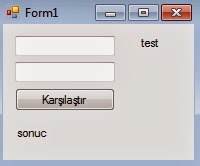
Örnek Kod:
----------
private void button1_Click(object sender, EventArgs e)
{
int a = String.Compare(textBox1.Text, textBox2.Text);
test.Text = a.ToString();
if (a == 0) sonuc.Text = "Bilgiler Aynı";
else if (a < 0) sonuc.Text = textBox1.Text + " " + textBox2.Text + " den küçük";
else sonuc.Text = textBox1.Text + " " + textBox2.Text + " den büyük";
}
19 Eylül 2011 Pazartesi
C# Console da Write ve WriteLine Komutları
namespace ConsoleApplication1
{
class Program
{
static void Main(string[] args)
{
Console.Write("Merhaba C#");
Console.WriteLine("Merheba ASP.NET");
Console.WriteLine("Bir Tuşa Basınız");
Console.ReadKey();
}
}
}
Açıklama: Write ve WriteLine komutları C# Console uygulamalarında ekrana metin yazdırmak amacıyla kullanılır. Line eklentisi yazım işleminden sonra imlecin bir alt satıra geçmesini sağlar.
{
class Program
{
static void Main(string[] args)
{
Console.Write("Merhaba C#");
Console.WriteLine("Merheba ASP.NET");
Console.WriteLine("Bir Tuşa Basınız");
Console.ReadKey();
}
}
}
Açıklama: Write ve WriteLine komutları C# Console uygulamalarında ekrana metin yazdırmak amacıyla kullanılır. Line eklentisi yazım işleminden sonra imlecin bir alt satıra geçmesini sağlar.
2 Aralık 2010 Perşembe
2 Boyutlu Dizi Örneği
using System;
using System.Collections.Generic;
using System.Text;
namespace Console_dizi_cokboyutlu
{
class Program
{
static void Main(string[] args)
{
int[,] dizi = new int[4, 3];
int i, j,sutun=1,satir=1;
for (i = 0; i < 4; i++)
{
for (j = 0; j < 3; j++)
{
Console.SetCursorPosition(sutun, satir);
Console.Write(".");
sutun += 6;
}
sutun = 1;
satir += 4;
}
sutun = 1; satir = 1;
for (i = 0; i < 4; i++)
{
for (j = 0; j < 3; j++)
{
Console.SetCursorPosition(sutun, satir);
dizi[i, j] = int.Parse(Console.ReadLine());
sutun += 6;
}
sutun = 1;
satir += 4;
}
Console.ReadKey();
}
}
}
30 Eylül 2010 Perşembe
C# da Değişken Tipleri
Tam Sayı Değişken Tipleri
-------------------------
Type Size Range (aralık)
sbyte 8 -128 to 127
byte 87 0 to 255
short 16 -32768 to 32767
ushort 16 0 to 65535
int 32 -2147483648 to 2147483647
uint 32 0 to 4294967295
long 64 -9223372036854775808 to 9223372036854775807
ulong 64 0 to 18446744073709551615
char 16 0 to 65535
Ondalıklı Değişken Tipleri
--------------------------
Type Size Range
float 32 7 digits 1.5 x 10-45 to 3.4 x 1038
Double 64 15-16 digits 5.0 x 10-324 to 1.7 x 10308
Decimal 128 28-29 decimal places 1.0 x 10⁻²⁸ to 7.9 x 1028
Diğer Değişken Tipleri
----------------------
string karaktersel ifadeler için kullanılır
bool mantıksal değişken. (true ve false değerlerini alır)
C# da Parse Methodu ile Tip Dönüşümleri
Açıklama:
---------
Parse, String tipteki verilerin sayısal tiplere dönüşümünü sağlayan methoddur.
Kullanımı:
----------
tip_adı.Parse(string veri);
Örnek Kodlama:
--------------
using System;
using System.Collections.Generic;
using System.Text;
namespace console_008
{
class Program
{
static void Main(string[] args)
{
int a, b, t;
Console.Write("1.Sayıyı Giriniz :");
a = int.Parse(Console.ReadLine());
Console.Write("2.Sayıyı Giriniz :");
b = int.Parse(Console.ReadLine());
t = a + b;
Console.WriteLine("Sayıların Toplamı :"+t);
Console.ReadKey();
}
}
}
C# Console da ReadLine( ) komutu
Açıklama:
Console ortamında klavyeden bilgi okutmak amacıyla kullanılan bir komuttur. Okutulan bilgiler her zaman string tipindedir. Dolayısıyla sayı ya da başka tipte kullanım yapılmak istendiğinde tip dönüşümü yapılması gerekir. Tip dönüşümleri başka derslerde açıklanacaktır.
Örnek Kodlama :
---------------
using System;
using System.Collections.Generic;
using System.Text;
namespace console_007
{
class Program
{
static void Main(string[] args)
{
string s;
s = Console.ReadLine();
Console.WriteLine("Girdiğiniz Metin : "+s);
Console.ReadKey();
}
}
}
Kaydol:
Kayıtlar (Atom)